
Ultimate Guide to Problem Prioritization for Startups
Most startups don’t waste time because they move too slowly. They waste time because they work on the wrong problem.
If I had to sum up this guide in a few lines, it would be this:
- I should rank problems before I rank features.
- I should score problems using impact, reach, urgency, effort, evidence, workarounds, and learning value.
- I should use the lightest scoring method my data can support:
- I should tie each top problem to one KPI, one owner, and one next test.
- I should review priorities weekly, monthly, and quarterly so the backlog doesn’t go stale.
The article’s core point is simple: problem prioritization is a decision system. It helps me decide what to test, what to build, what to delay, and what to say no to.
A few numbers from the piece make that clear. About 80% of software features are rarely or never used, and SaaS firms spent about $29.5 billion in 2025 on features that went unused. The guide also points out that teams with a set review process are 2.4x more likely to hit quarterly outcome targets, while teams without steady backlog cleanup can spend about 30% of planning time just figuring out what still matters.
Here’s the short version of how I’d use the guide:
- Build a clean backlog of problems.
- Write each problem in plain language.
- Attach proof like quotes, ticket counts, or conversion data.
- Score each problem with a framework that fits my stage.
- Map the top items to activation, retention, expansion, or cost savings.
- Test before I commit roadmap time.
- Write down why I said yes, no, or not now.
That’s the whole system in plain English: find the pain, prove it, rank it, test it, and review it on a set schedule.
You Don’t Need Another Prioritization Framework: Just These 4 Components
::: @iframe https://www.youtube.com/embed/5t8yDzvGLTk :::
Build a Reliable Problem Backlog Before You Score Anything
Don’t score problems until your backlog is clean, consistent, and easy to compare. Before you use any framework, you need a structured list of problems written the same way, backed by proof, and tagged with enough context to judge them fairly.
Where Startup Problems Come From
Problems show up all over the place: customer interviews, sales calls, support tickets, product analytics, public forums, and review sites. But not every complaint belongs in the backlog.
What matters is evidence of action. Real pain tends to show up when people are already spending time or money on clunky workarounds, like complex spreadsheets, manual scripts, or Zapier automations stitched together to fill a gap [5].
One complaint on its own is thin evidence. The same complaint showing up across separate conversations, different segments, and multiple channels? That’s a pattern worth logging.
Write Standardized Problem Statements With Evidence
Once you collect problems, write them in a consistent format so you can compare them side by side. A solid structure looks like this:
[Persona] needs to [achieve an outcome] but struggles with [specific obstacle] because of [root cause], resulting in [measurable consequence].
For example:
Solo freelance designers earning $75–150K need to predict cash flow three months ahead but struggle because invoices sit unpaid for 30–60 days due to a lack of automated follow-up, resulting in stress about rent and turning down new projects [5].
This format forces you to get specific. If a problem statement takes more than two or three sentences, it’s probably still too vague.
Each statement should also include the cost of inaction. In plain English: what does this problem cost if nothing changes? That cost might show up in hours, dollars, or risk. For B2B, score it lower when the cost of inaction is small compared with revenue, retention, or day-to-day operations.
To keep scoring tied to facts, attach data points like:
- Interview quotes
- Ticket counts
- Conversion numbers
That way, your scores come from evidence, not gut feel [7]. These tags also make later scoring faster and more consistent.
Tag Each Problem With Reach, Severity, and Confidence
Tag each problem with reach, severity, confidence, and lifecycle stage. Confidence needs extra care. A problem may sound high impact, but if the proof is weak, the confidence score should stay low.
That gives you a safety valve. It helps you avoid chasing ideas that sound great on the surface but haven’t been validated yet [5].
A structured workspace like InspectIdea can keep problem statements, evidence, and assumptions in one place.
With a clean, tagged backlog, you can move into scoring with much less guesswork.
Use Practical Frameworks to Score and Rank Problems
::: @figure 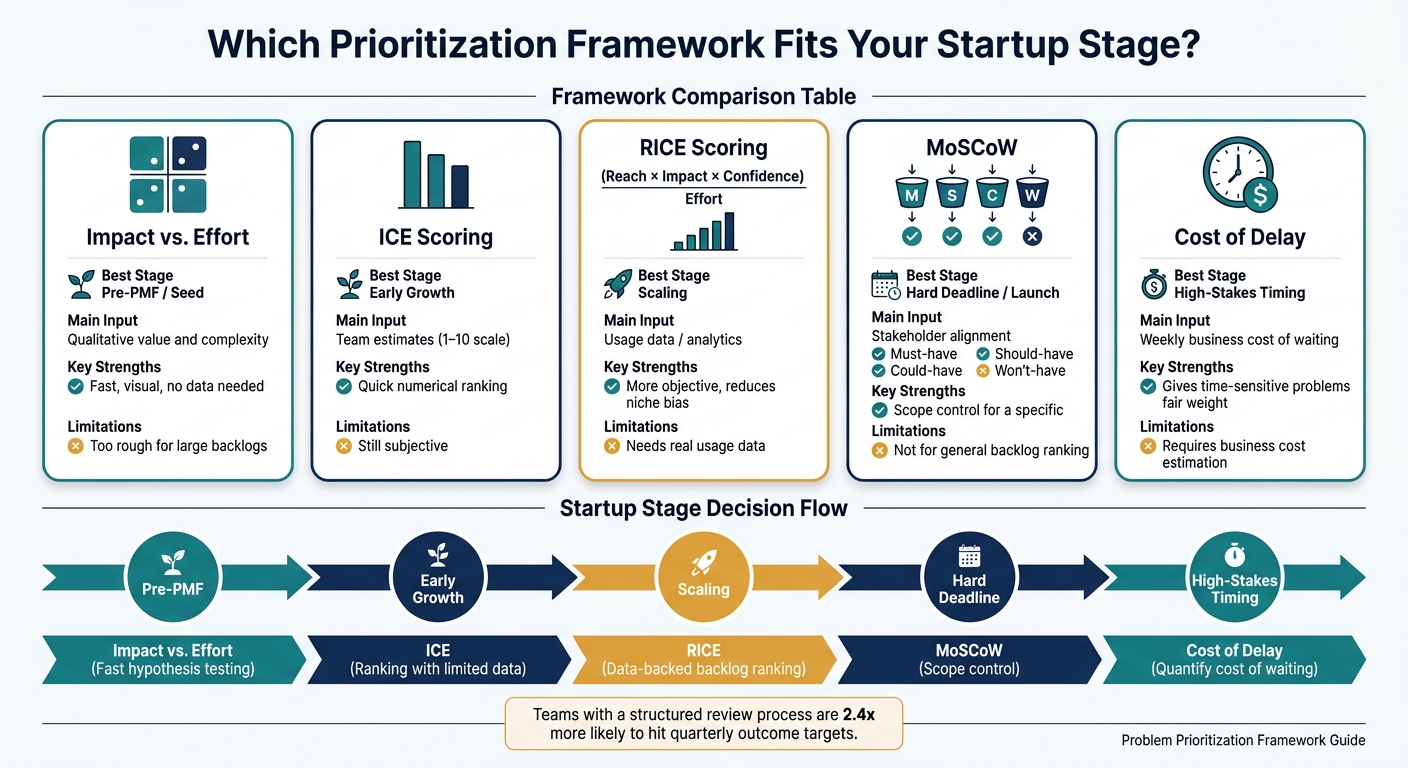 {Startup Problem Prioritization Frameworks: Which One Fits Your Stage?}
:::
{Startup Problem Prioritization Frameworks: Which One Fits Your Stage?}
:::
Use the lightest scoring framework your data can support. The point of scoring is to make the backlog easier to compare, not to replace judgment. Each framework trades off speed, rigor, and evidence in a different way. Pick the one that fits your stage and the quality of your data.
Impact vs. Effort, ICE, and RICE for Fast and Structured Scoring
Impact vs. Effort is the simplest place to start. You map each problem on a 2x2 grid based on the value it creates for users and how hard it is to solve. Problems in the top-left quadrant - high value, low effort - are your Quick Wins. Bottom-right problems - low value, high effort - are Time Sinks.
This works best for pre-PMF startups and small teams that need fast, directional calls. It’s simple, visual, and easy to use when you don’t have much data yet.
ICE scoring adds more structure. You score each problem on Impact, Confidence, and Ease using a 1–10 scale, then multiply the numbers together. It fits early-growth startups that have found PMF but still lean more on estimates than deep usage data.
At that stage, problems your team understands well should beat speculative ones. That’s where ICE helps. It gives you a quick numeric way to sort ideas without pretending the numbers are perfect.
RICE adds one more input: Reach, or the number of users affected in a given period. The formula is (Reach × Impact × Confidence) / Effort. RICE fits scaling teams that have usage analytics and need a ranked backlog that can stand up in product and engineering discussions [1][2].
That makes rankings easier to defend across product, engineering, and leadership.
| Framework | Best Startup Stage | Main input | Strengths | Limitations |
|---|---|---|---|---|
| Impact vs. Effort | Pre-PMF / Seed | Qualitative value and complexity | Fast, visual, no data needed | Too rough for large backlogs |
| ICE | Early Growth | Team estimates (1–10) | Quick numerical ranking | Still subjective |
| RICE | Scaling | Usage data / analytics | More objective; reduces niche bias | Needs real usage data to be credible |
MoSCoW and Cost of Delay for Urgency and Business Timing
MoSCoW sorts problems into four buckets: Must-have, Should-have, Could-have, and Won't-have. It works best for scoping a specific release or MVP, not for ranking a general backlog.
Use it when you need stakeholder alignment around a hard deadline and want everyone clear on what’s in and what’s out. Keep the Must-have list tight. And treat the Won't-have bucket like a real choice, not a parking lot for awkward decisions.
Cost of Delay looks at the problem from another angle. Instead of asking which issue seems biggest, it asks what the business loses for every week the problem stays unsolved.
That makes it useful when you’re weighing technical debt, performance issues, and other infrastructure work against new feature requests. It gives time-sensitive problems a fair shot against work that is easier to see but slower to pay off.
| Problem | Without Urgency Lens | With Cost of Delay Applied |
|---|---|---|
| Broken onboarding flow | Slips lower in the backlog | Rises because each week of delay compounds lost activation |
| New dashboard feature | May look important on the surface | May fall if the business impact is limited and delayed |
| Slow API response | Can be easy to defer | Rises if it threatens retention or blocks growth |
Choose the Right Framework for Your Stage and Data Quality
No single framework fits every stage. Start with the simplest one that matches your stage and evidence. You can add more rigor as your team grows and your evidence base gets stronger.
| Startup Stage | Recommended Framework | Primary Goal |
|---|---|---|
| Pre-PMF | Impact vs. Effort | Fast hypothesis testing |
| Early Growth | ICE | Ranking a backlog with limited data |
| Scaling | RICE | Transparent, data-backed backlog ranking |
| Hard Deadline / Launch | MoSCoW | Scope control for a specific release |
| High-Stakes Timing | Cost of Delay | Quantifying the cost of waiting |
Next, translate ranked problems into business outcomes, metrics, and runway decisions.
Connect Priorities to Strategy, Metrics, and Runway
Turn ranked problems into metrics, decisions, and trade-offs. For each top problem, define the business outcome, the KPI, and the call you can make based on your runway. The first step is simple: tie each priority to one measurable outcome.
Map Each Priority to a Business Outcome
Capture the current baseline before you build anything. If you skip that step, you won't know whether the work changed the metric.
Tie each problem to one growth lever: activation, retention, expansion, or cost reduction. If you can't name the metric and the evaluation window, that item isn't ready for the roadmap.
| Growth Lever | Example Problem | Primary KPI |
|---|---|---|
| Activation | Users drop off before completing setup | Activation rate, time-to-value |
| Retention | Core workflow breaks under load | Churn rate |
| Expansion | No admin controls for multi-team use | Expansion MRR |
| Cost Reduction | Manual reconciliation between systems | Hours saved, cost-to-serve |
Once the metric is clear, decide where the problem fits: quick wins, big bets, or learning work.
Balance Quick Wins, Big Bets, and Learning Opportunities
Limited runway calls for a mix of quick wins, big bets, and learning work. Fill the roadmap with only quick wins, and you may end up polishing a product that still isn't growing. Go all-in on big bets, and you can burn runway before you've earned those swings.
If a problem is just nice to have, or if there's an easy workaround, push it back until the team has room.
That mix also needs regular check-ins. What looked urgent last month can lose steam fast.
Review Priorities on a Cadence That Matches Team Size
Priorities get stale as metrics, market conditions, and new evidence shift.
A simple three-part cadence works well:
- Weekly triage for urgent issues
- Monthly backlog reviews when evidence changes
- Quarterly resets for runway and strategy
Teams that use a structured review process are 2.4x more likely to hit their quarterly outcome targets [4].
"The word 'no' (or 'not this quarter') is the primary output of a real prioritization process. Teams that cannot say no do not have a prioritization process. They have a commitment problem." - IdeaPlan Editorial [4]
InspectIdea can store scores, assumptions, research, and rationale in one workspace.
Turn Problem Prioritization Into an Ongoing Practice
Turn Prioritized Problems Into Experiments and Roadmap Decisions
Once a problem has a rank, don't send it straight into the roadmap. Test it first.
A simple way to do that is to write a testable hypothesis. For example: "At least 3 out of 10 target users will describe this as a top-3 pain point." That one sentence gives you a clear pass/fail result instead of a fuzzy sense that you're "making progress" [3].
Then run the smallest test that can give you evidence. That might be a customer call, a landing page test, or a manual pilot. After that, update the backlog and the scores based on what you learned [1][2].
When the test is done, write down the decision so the backlog doesn't drift out of date.
Assign Ownership and Document Why Decisions Were Made
As teams get bigger, unwritten prioritization starts to fall apart. The answer isn't some heavy process. It's a simple habit: write down the reason for every scored problem, including what you decided not to work on and why [1][6].
That written record helps guard against stale priorities. It keeps the backlog honest when new evidence comes in or conditions change.
For each prioritized problem, capture:
- the owner
- the target metric
- a one-line rationale
- the list of items marked "Won't Have" for the current cycle [4][2]
The point of prioritization isn't to make a perfect list. It's to build a decision cycle your team can use again and again.
Conclusion: A Repeatable System for Better Startup Decisions
Repeat the loop: prioritize, test, document, revisit.
Teams without a regular grooming habit spend an average of 30% of their planning time just figuring out which backlog items still matter [4]. A light, steady system - like biweekly triage plus a monthly or quarterly review - helps the team stay focused on problems worth solving.
"Fall in love with the problem, not the solution." - Marty Cagan, Product Executive [5]
The goal isn't a perfect prioritization system. It's a repeatable one - where every decision is written down, every score comes from evidence, and every "not this quarter" is just as deliberate as every "yes."
FAQs
::: faq
How do I know if a problem is real or just a one-off complaint?
Look for proof in what people do, not just what they say. A real problem tends to show up again and again, feel urgent, and lead to clear costs like lost revenue, wasted time, or compliance risk.
One of the best signs is when customers have already patched together a fix. Maybe they’re living in spreadsheets, juggling duct-taped tools, or paying someone to handle the mess by hand. That kind of behavior tells you the pain is there.
On the other hand, be careful when people say something “sounds cool” but haven’t done anything to fix it. Interest is nice. Action is what counts. :::
::: faq
Which prioritization framework should I use at my startup stage?
It depends on where your team is right now and what you’re trying to do next.
If you’re early-stage and still pre-product-market fit, focus on evidence-based validation. That’s where RAT comes in. It helps you check whether the problem is worth solving before you sink time and money into building.
For MVP planning, MoSCoW is a solid way to split must-have problems from the nice-to-have ones. Simple, clear, and useful when everything feels urgent.
Once you start getting traction, RICE or ICE can help you compare impact against effort. That makes it easier to decide what deserves attention now and what can wait.
No matter which framework you use, the core idea stays the same: prioritize problems based on actual user behavior and real pain points, not just gut feeling or theory. InspectIdea can help you articulate ideas, stress-test frameworks, and validate assumptions. :::
::: faq
How often should we review and update our problem backlog?
Review it monthly to catch small shifts, and quarterly for bigger strategic resets so it stays aligned with user needs and market conditions.
If market conditions or performance baselines change in a major way, review it right away. InspectIdea can help by helping you clarify ideas, pressure-test frameworks, and check assumptions so you can spot risks or gaps that may call for reprioritization. :::